What is Nyx ransomware?
Nyx is a new virus that operates using the ransomware model. This means that it attempts to generate money by encrypting the files of its victims and then demanding money to decrypt them.
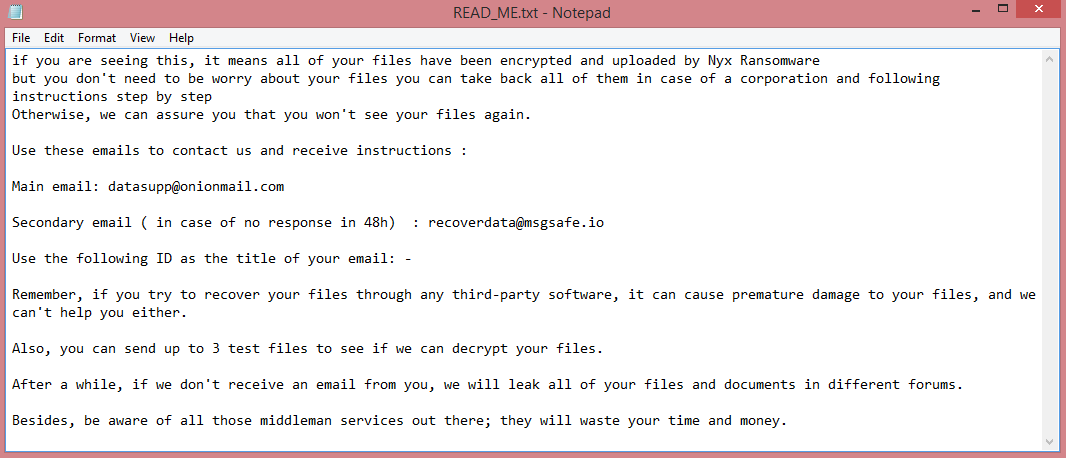
Aside from encryption itself, the virus also performs several other actions. It renames the files it encrypts to make it obvious that they were intentionally encrypted and not simply damaged. A unique ID, the hacker’s e-mail, and .NYX file extension get appended to the end of each file name, in that order. It also creates a ransom note called “READ_ME.txt”. You can read the note on the image above, though it is not particularly informative; the victims are merely instructed to contact the hackers for further instructions.
It is worth noting, however, that the hackers are only willing to deal with corporations. Obviously, that doesn’t mean that normal people can’t become victims, as the criminals have no incentive to care about collateral damage. Thankfully, there are certain methods that you can use to remove Nyx ransomware and decrypt .NYX files without dealing with them. Some of these methods are explained in the guide below.
![RYKCRYPT ransom note:
All your files have been encrypted!
All your files have been encrypted due to a security problem with your PC. If you want to restore them, write us to the e-mail; encoderdecryption@gmail.com
Write this ID in the title of your message : [REDACTED]
In case of no answer in 24 hours write us to theese e-mails: encoderdecryption@yandex.ru
You have to pay for decryption in Bitcoins. The price depends on how fast you write to us. After payment we will send you the decryption tool that will decrypt all your files.
Free decryption as guarantee
Before paying you can send us up to 1 file for free decryption. The total size of files must be less than 1Mb (non archived), and files should not contain valuable information. (databases,backups, large excel sheets, etc.)
How to obtain Bitcoins
The easiest way to buy bitcoins is LocalBitcoins site. You have to register, click 'Buy bitcoins', and select the seller by payment method and price.
https://localbitcoins.com/buy_bitcoins
Also you can find other places to buy Bitcoins and beginners guide here:
http://www.coindesk.com/information/how-can-i-buy-bitcoins/
Attention!
Do not rename encrypted files.
Do not try to decrypt your data using third party software, it may cause permanent data loss.
Decryption of your files with the help of third parties may cause increased price (they add their fee to our) or you can become a victim of a scam.
This is the end of the note. Below you will find a guide explaining how to remove RYKCRYPT ransomware.](https://www.computips.org/wp-content/uploads/2023/01/how-to-remove-rykcrypt-ransomware.png)
![Zendaya ransomware:
Your Files Are Has Been Locked
Your Files Has Been Encrypted with cryptography Algorithm
If You Need Your Files And They are Important to You, Dont be shy Send Me an Email
Send Test File + The Key File on Your System (File Exist in C:/ProgramData example : RSAKEY-SE-24r6t523 pr RSAKEY.KEY) to Make Sure Your Files Can be Restored
Make an Agreement on Price with me and Pay
Get Decryption Tool + RSA Key AND Instruction For Decryption Process
Attention:
1- Do Not Rename or Modify The Files (You May loose That file)
2- Do Not Try To Use 3rd Party Apps or Recovery Tools ( if You want to do that make an copy from Files and try on them and Waste Your time )
3-Do not Reinstall Operation System(Windows) You may loose the key File and Loose Your Files
4-Do Not Always Trust to Middle mans and negotiators (some of them are good but some of them agree on 4000usd for example and Asked 10000usd From Client) this Was happened
Your Case ID : [REDACTED]
OUR Email :Decryption.helper@aol.com
in Case of no answer: Decryption.help@cyberfear.com
This is the end of the note. Below you will find a guide explaining how to remove Zendaya ransomware.](https://www.computips.org/wp-content/uploads/2023/01/how-to-remove-zendaya-ransomware.png)